Advertisement
Leaderboard




Popular Content
Showing content with the highest reputation on 06/30/2018 in all areas
-
There are a lot of members that are posting support requests regarding problems during upgrading their suites. To prevent more topics from being opened in the support section, I'll have a guide on how to upgrade your forum correctly. Things Needed; Shared Hosting or Virtual Server Knowledge of Cpanel's File Manager Follow Instructions Instructions; Head over to the IPS Community Suite and download the latest WF version - https://webflake.sx/files/category/147-ips-community-suite-44/ Once you have downloaded the latest version, log into your hosting control panel. Find and open file manager. Go into the directory your IPS Suite is in - This is usually public_html, /community/, /forum/, or /forums/. Click Upload. Select File. Find the IPS Suite archive you've downloaded from WF. Upload it. Once it has been uploaded, refresh the directory. You'll see the archive in your directory. Right click and click "Extract". All of the folders from the archive will be extracted into your directory. It will be in a folder with the title of the archive to keep it organized. Go into the folder inside your directory. Holding the Ctrl key, click all the files. Once they have all been highlighted, drag them into the directory your IPS Suite is in. The old files will be overwritten. You will have to change the permissions of the following directories to 777 - /applications/, /datastore/, /plugins/, /uploads/, and /uploads/logs/ - To change the permissions, right click on those directories in the file manager and click Change Permissions. Check all of the check boxes. Open a new tab and enter your forum url into the address bar. Before you hit enter, type the location of your IPS ACP followed by the upgrade directory - /admin/upgrade/ Using an administrator account, follow the upgrade steps. Instruction GIFs;2 points
-
Hello guys, i just wanted to share my nginx setup which includes removing the index.php part, so enjoy server { server_name site.com www.site.com; root /var/www/html/forum; index index.php; location / { #try_files $uri $uri/ =404; if (!-f $request_filename){ set $rule_0 1$rule_0; } if ($rule_0 = "1"){ rewrite /.(js|css|jpeg|jpg|gif|png|ico|map)(?|$) /404error.php last; } if (!-f $request_filename){ set $rule_1 1$rule_1; } if (!-d $request_filename){ set $rule_1 2$rule_1; } if ($rule_1 = "21"){ rewrite /. /index.php last; } } location ~ \.php$ { # remember to change this to your specific php version. fastcgi_pass unix:/run/php/php7.1-fpm.sock; include snippets/fastcgi-php.conf; fastcgi_param SCRIPT_FILENAME $document_root$fastcgi_script_name; } location ~ /\.ht { deny all; } }1 point
-

Version 1.1.0
139 downloads
Theme edited at a rate of 85% no bugs has no error everything works perfectly! Those satisfied please leave rep! Success.1 point -
Version 2.0.0
69 downloads
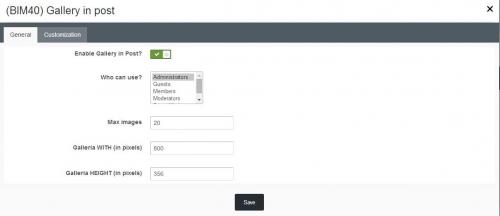
This plugin allows members insert an awesome gallery in post. Main Features: Enable/disable Groups can use Responsive Gallery Customizations: width/height, autoplay, thumbnail, transitions, speed, image crop There is a form in editor that helps members easy to add images, captions, or select their album (if Ip.Gallery is installed) (After creating bbcode, you need to refresh page to see the gallery) Live Demo: http://ipsviet.com/topic/59483-bim40-gallery-in-post/1 point -
hey all members, if you haven't noticed..... this is the best forum for to get what you need for IPB and other formats. these guys know what they are doing and get it done. i am very proud to be a member here, and wish the staff here the best in the future. lol, btw i am tone a forum owner myself, and come here often for the best support, and apps and plugins available. thanks guys for everything you do. tone, Best Regards1 point
-
These are both default features of IPS 4.2 and 4.3. Reactions and Recommended posts, respectively.1 point
-
yes friend version 4.3 better1 point
-
THe backend is a much better upgrade than what they have done on the frontend. I also found there to be a slight but noticable speed increase.1 point
-
Version 1.0.0
101 downloads
[TH] Nodes allows you to style your nodes, icons, and so much more. Rather it being changing the node color, style, or icon on a specific node for just one or two of your themes.Features include: Allows for multiple column layouts of nodes that can be set globally for all categories, on individual categories, or within a category Layouts are fully responsive based on the device viewing them allowing for the theme creator to decide how to optimally show the nodes on their forum Allows for customization of individual nodes backgrounds, and colors Allows you to set a custom read/unread icon for each forum Also this add-on allows you to navigate to a forum or sub-forum faster by clicking the more link below the node. Also, you can post a new thread easily by clicking the plus symbol which is also below each node.1 point -
Version 2.2.0
554 downloads
This hook will allow users to use colors in topic title when creating a topic. Topic title colored will appear in forum view and in topic view. [b]Settings:[/b][list] [*]Admins can set aditional places to show: [/list] - board index (last post info in categories) - Recent Topics sidebar hook - Search results - Tab profiles (topics and posts)[list] [*]User groups can create topic title colored [*]Forums where users can create topic title colored [/list] [b]Note:[/b] Version 2.0.1: IP.Board 3.2.X Version 2.1.1: IP.Board 3.3.X Version 2.2.0: IP.Board 3.4.X1 point -
Nice plagiat)))-1 points








This leaderboard is set to New York/GMT-04:00