Key Changes
Normally we reserve second-point releases for major updates to our site but we've made some significant updates to our Discord server that warrant a big jump in versioning. Let's get started with the site updates as we have some ground to cover regarding Discord.
-
Added Member of the Month application. Throughout the month, users will cast their vote for WebFlake's newest MOTM. At the end of the month, an administrator will review the voting results and select the newest MOTM based on those results.
- See this thread for additional information: https://webflake.sx/topic/22237-webflakes-member-of-the-month/
- Framework for a new Guides page has been implemented. We'll be releasing details on this later.
- Added new FA-icon for the Leaderboard menu tab.
- Added MOTM archive page as a sub-link below Leaderboard (also gave it a fancy trophy icon).
We're adding some exciting new features to our Discord server! Let's cover the changelog first:
- DISCORD: added DynoBot for auto-moderation. Assists with blacklisted URLs, words, and blocks server invites (basically stops baddies). Dyno will auto-DM users who are banned, kicked, or muted. Also announces new members.
- DISCORD: added the Tatsumaki bot, which adds an enormous amount of functionality to our Discord server. XP, levels, reputation, customize profiles with credits, utilities, fun commands, and more.
Additional Information
A note on bot commands: when executing a command to customize your profile, redeem credits/badges, or similar commands, please use our #bot-commands channel. When showing off your profile, sharing memes, or using any of the fun or social commands, feel free to use them in #general.
That said, let's cover some of Tatsumaki's features and commands!
XP, Levels, and Reptuation
How the XP system works:
- XP is gained every time you talk with a 2 minute cooldown.
- XP is not determined by the size of the message. You will not get more XP just because the message is bigger.
- XP is randomized from 10-20.
- There is global and local XP. Local XP, is XP gained on a server and is represented in the user's server score. Global XP is global and cannot be modified using commands.
The reputation system lets members upvote another member of their choice. Reputation is prominently displayed on profiles!
Preview: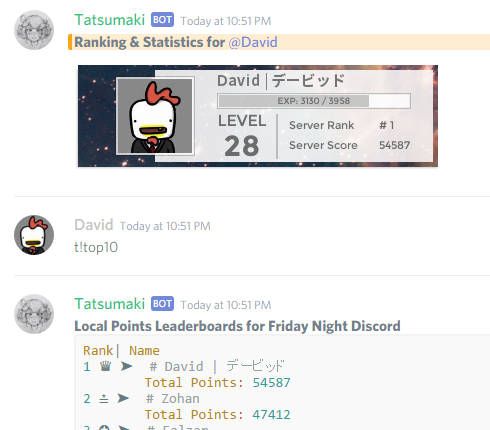
Credits & Customization
Currency in the form of credits allows members to purchase customizations for commands such as !profile and !rank.
How to get credits:
-
You get credits for Talking, Leveling, and Using
!dailies. - Credits are global and cannot be modified by a command.
Members can personalize their profile & rank displays by adding their information and changing their backgrounds!
Profile Badges
Badges are rewards for certain achievements that can be placed on your personal profile so everyone can see what you have achieved! Badges don't really have any perks or tricks. They're just for show, valuable to have.
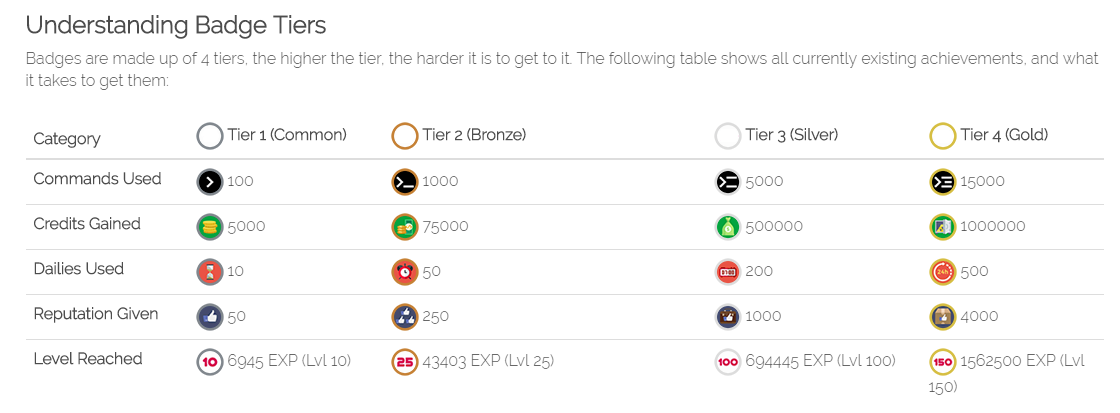
What happens when I get an achievement?
Once you get an achievement, Tatsumaki will not warn you nor will she automatically redeem the badge for you. Unfortunately, doing that would require an additional layer of checks for every single message that Tatsumaki sees. So we can't do it. But you can still redeem badges by using !badges redeem. We will cover all about that command on the area bellow.
Redeeming Badges
When getting an achievement, the next command you want to think about is !badges redeem. It is the command that "transforms" your achievements into actual items you can show on your profile. When you do the command, 2 options will appear, those are the two types of redeemable items that exist so far on Tatsumaki:
Redeemable Badges
This is the first option in !badges redeem. These are the badges that you get with achievements. When you choose this option, either it will say the badges you have to redeem so far, or it will say you don't have any badges to redeem. If the first one appeared, then just choose the badge you wish to redeem. If it said you didn't have any badges to redeem, then you will have to wait until you complete an achievement.
Purchasable Badges
This is the second option in !badges redeem. They are badges which you don't need an achievement to get. You instead buy them using your personal credits. Once you get to this option just choose which type of badge you wish to buy, and choose a badge that you like!
Why cant I see my badges after I redeem them?
After redeeming a badge, it won't instantly appear on your personal profile. You still need to equip the badge by using !badges equip. We will cover all about that command on the area below.
Equipping Badges
After you redeem a badge, you will need to use !badges equip to show that badge on your personal profile.
Once you do the command, a number grid will show up and you will be asked to choose an element of the grid. Each grid element corresponds to a place on the badges section in your personal profile (as depicted in the image below).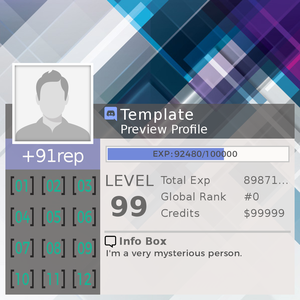
Choose a grid element and then choose which badge you would like to place in it!
Frequently Asked Questions
Is there is a full list of commands?
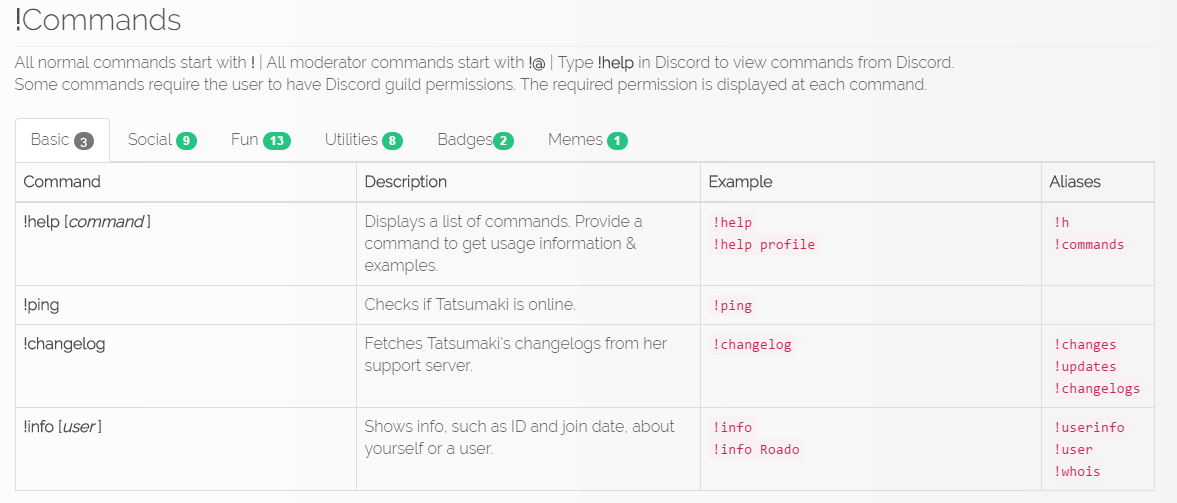
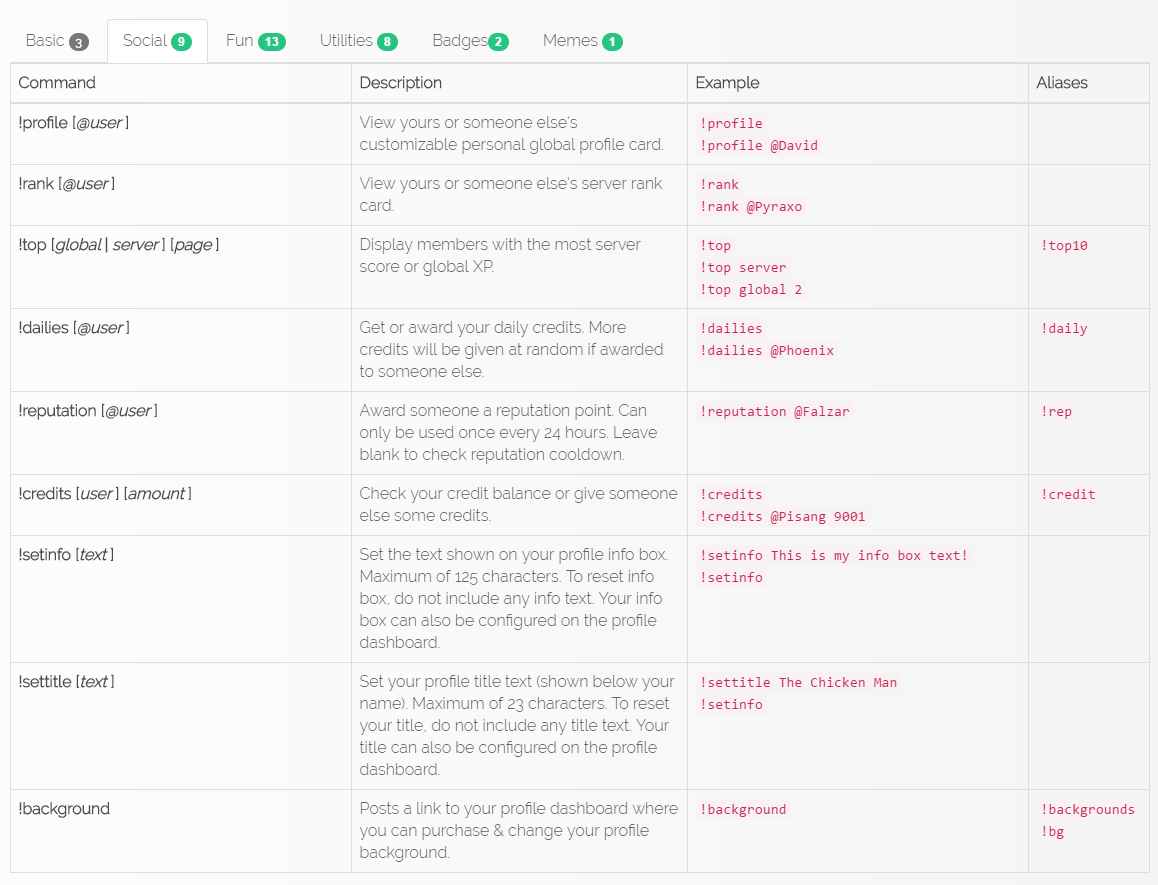
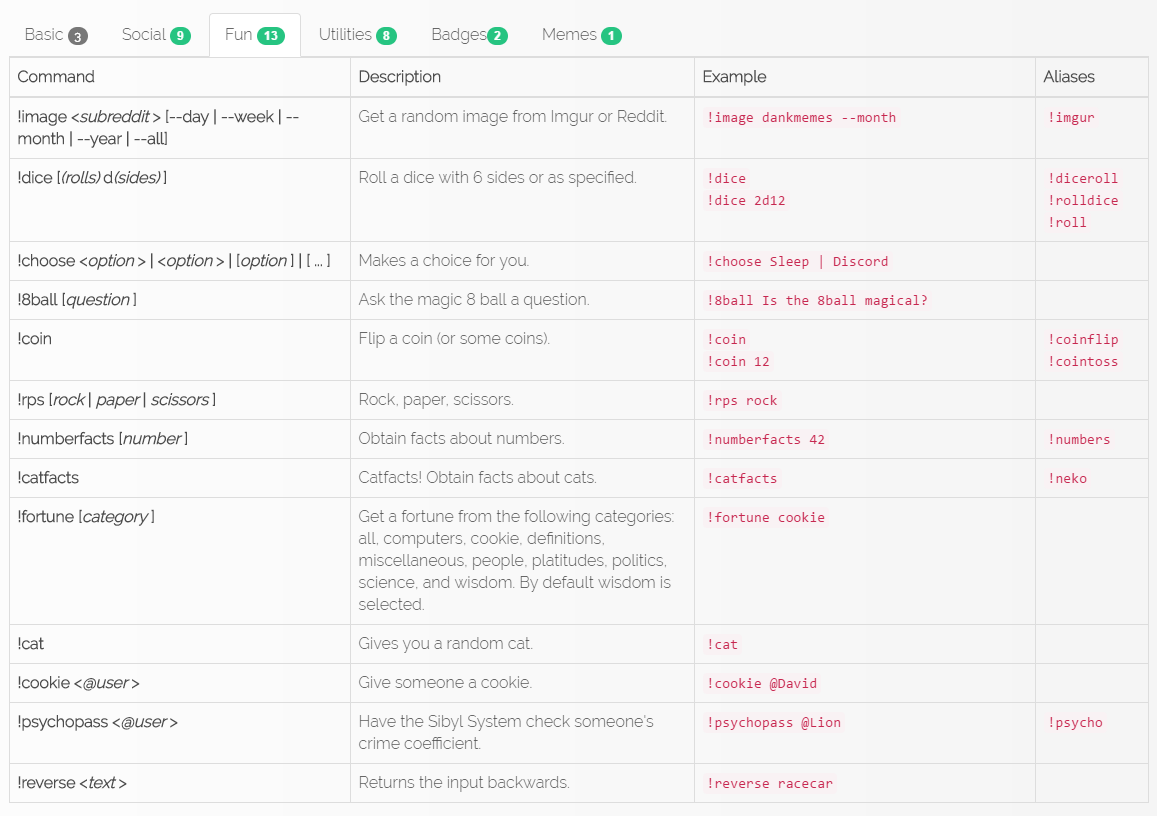
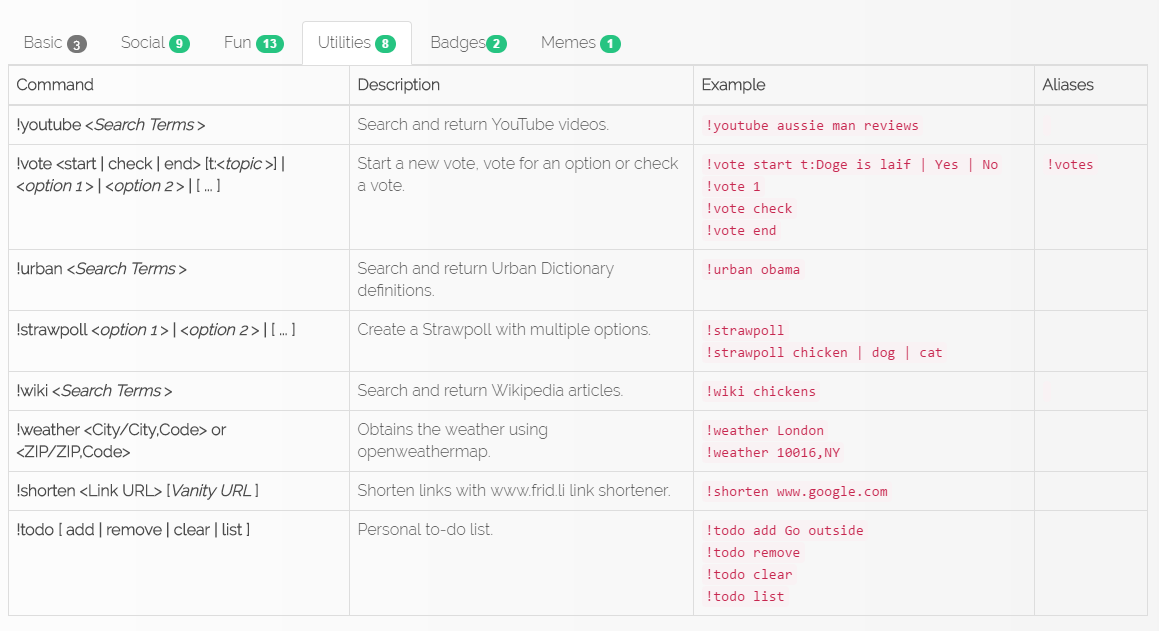
Yes, all bot commands available to WebFlake are displayed below.
Are botting or other similar activities allowed?
Any actions performed to gain an unfair advantage over other users are explicitly against the rules. This includes botting and using macros.
Can I add my own custom backgrounds to the bot?
No, that would require some moderation for the backgrounds and it would defeat the point of saving credits to buy them. You can still submit backgrounds here.
Can I transfer my reputation points and my XP to another user?
No. Reputation points don't work like credits do. XP is gained from being active and you can't do anything with it except gain it. Once you give someone a reputation point, their number never goes down.
How do I check my profile?
You use !profile and/or !rank
Available Commands